v0.3.5
Customizer tab with preview and save workflow
Highlights
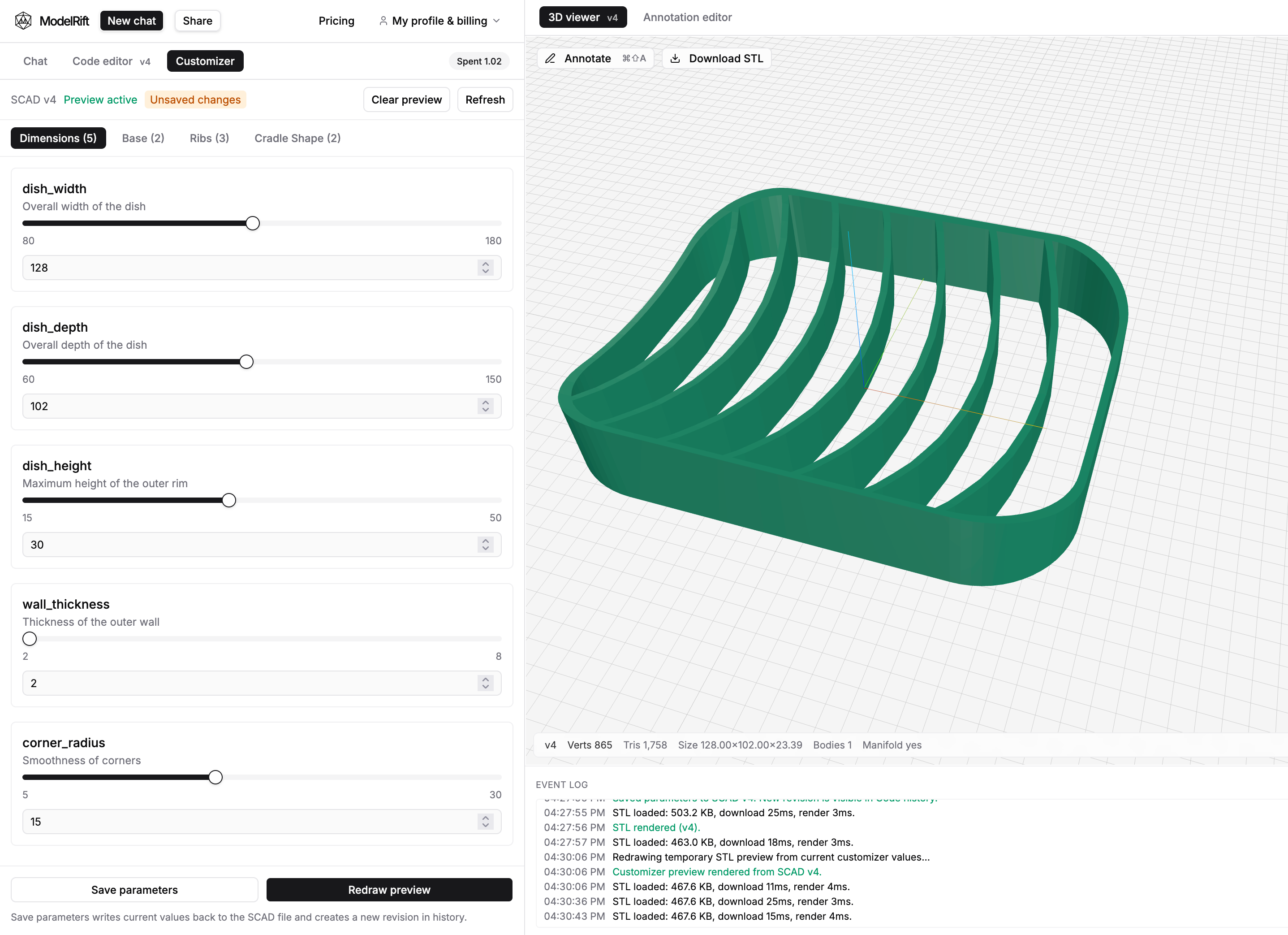
- New Customizer tab with grouped parameter controls and live temporary STL redraw
- Save parameters writes defaults back to SCAD and creates a new revision
- Improved customizer controls: better sliders, unsaved marker, and clearer tab visibility
What’s New
New Customizer tab in the editor
- Added a dedicated Customizer tab next to Chat and Code editor
- Parameters are inferred from SCAD customizer-compatible assignments and grouped into tabs
- Each tab now shows a visible parameter count, for example Dimensions (5)
Better preview workflow
- Redraw preview now renders a temporary STL from current customizer values without creating SCAD history noise
- The redraw action is enabled only when values changed since the last preview render
- Save flow no longer flashes back to an older STL while waiting for the new revision render
Save parameters as defaults
- Added Save parameters next to redraw
- This writes the current values back into SCAD defaults and creates a new SCAD revision visible in history
- Includes support for exposing and saving top-level $fn where present in customizer-compatible SCAD
UI polish for controls
- Replaced basic range inputs with cleaner shadcn-style sliders
- Added an Unsaved changes marker so it is obvious when current values differ from saved defaults