How we added multicolor 3MF export to ModelRift
Getting color information from OpenSCAD's color() calls into a slicer-ready 3MF file is messier than it looks. Here's how we built it.
OpenSCAD’s color() module has always been a preview-only feature. It colors geometry on screen so you can distinguish parts visually. When you hit F6 to render and export, the colors disappear - every colored part gets merged into one homogeneous mesh.
For a single-color print this doesn’t matter. But if you want to print in multiple colors, you need separate meshes: one per filament. The traditional workaround looks like this:
export_color = "all"; // [all, red, white]

module label_base() {
  if (export_color == "all" || export_color == "red")
    color("red") cylinder(h=3, r=20);

  if (export_color == "all" || export_color == "white")
    color("white") translate([0, 0, 2])
      linear_extrude(1) text("Hi", size=8, halign="center", valign="center");
}

label_base();
You manually change export_color to "red", render, export to part_red.stl. Then change it to "white", render, export to part_white.stl. Load both into your slicer, align them manually to the same origin, assign filaments. Miss the origin by 0.1mm and your label floats above the base.
The same if() pattern also shows up in the OpenSCAD customizer - it’s a natural way to render individual parts of an assembly by toggling a variable, not just for color separation. But for multicolor printing you end up doing it repeatedly for every color in the design, which gets tedious fast.
We wanted ModelRift to skip all of that. Ask the AI for a multicolor model, get one download that your slicer can open ready to print.
Why 3MF and not multiple STLs
The 3MF format is a ZIP archive containing an XML document. That document can hold multiple mesh objects in one file, each with its own color metadata. When a modern slicer opens it, it sees the objects as separate “parts” of one assembly, locked in position relative to each other by the transformation matrices in the XML. No alignment step.
The relevant structure looks like this:
<resources>
  <basematerials id="1">
    <base name="Red" displaycolor="#FF2020" />
    <base name="White" displaycolor="#FFFFFF" />
  </basematerials>
  <object id="2" pid="1" pindex="0"><!-- red mesh --></object>
  <object id="3" pid="1" pindex="1"><!-- white mesh --></object>
</resources>
<build>
  <item objectid="2" transform="1 0 0 0 1 0 0 0 1 0 0 0" />
  <item objectid="3" transform="1 0 0 0 1 0 0 0 1 0 0 0" />
</build>
Bambu Studio reads the displaycolor attributes and tries to match them to your loaded filaments by RGB distance. PrusaSlicer treats each object as a separate part assignable to a different extruder. The STL export endpoint still exists for single-color prints or slicers that prefer it, but 3MF is now the default.
The lazy-union feature in OpenSCAD
The piece that makes this work on the OpenSCAD side is “lazy union,” tracked in issue #350 and added to nightly builds in 2025. Normally if you have multiple top-level statements, OpenSCAD merges them into one mesh before export. With lazy union enabled, it keeps them as separate objects. When you export to 3MF, each top-level item becomes its own <object> in the file.
// With lazy union enabled, these produce TWO objects in the 3MF:
color("red") cylinder(h=3, r=20);
color("white") translate([0, 0, 2])
  linear_extrude(1) text("Hi", size=8, halign="center", valign="center");
Without lazy union, they’d merge into one grey blob. With it, the slicer gets two parts and prompts you to assign filaments.
We enable lazy union on every render call via the --enable lazy-union flag. This feeds into the customizer too: when you generate STL files for the customizer feature, they now also benefit from correct object separation in 3MF output.
The color export issue #4671 tracks the broader effort to get color metadata into exports, and #5065 covers getting colors to survive the F6 render step. These are still open, but for the specific use case of “separate colored parts that a slicer can assign to different filaments,” lazy union plus 3MF export gets you there today.
What the slicer sees
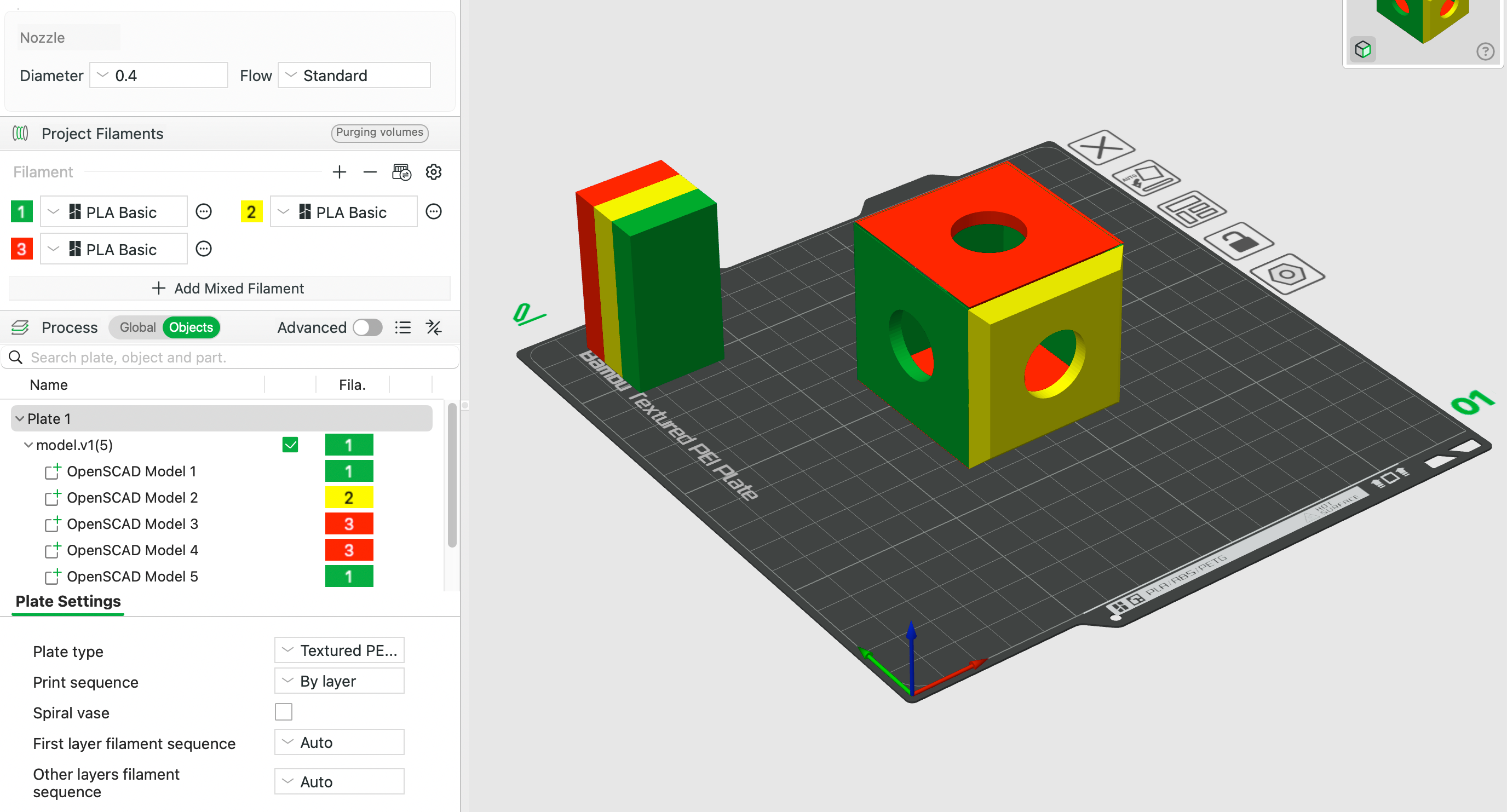
Bambu Studio imports the 3MF and shows five separate parts, each assignable to a different filament. The color matching happens automatically from the displaycolor metadata in the file.
Each color() call in the OpenSCAD script ends up as a named entry in Bambu’s object list. You can reassign them to different filaments, but the defaults come from the RGB values in the 3MF. PrusaSlicer handles the same file as a multi-part object with per-part extruder assignment.
Getting the geometry right
This is the part that doesn’t work automatically. Lazy union produces separate objects in the 3MF, but if those objects have overlapping volumes, the slicer still has to decide which filament wins in the overlap region. It usually uses object list order as a tiebreaker, but the results are not always what you’d expect.
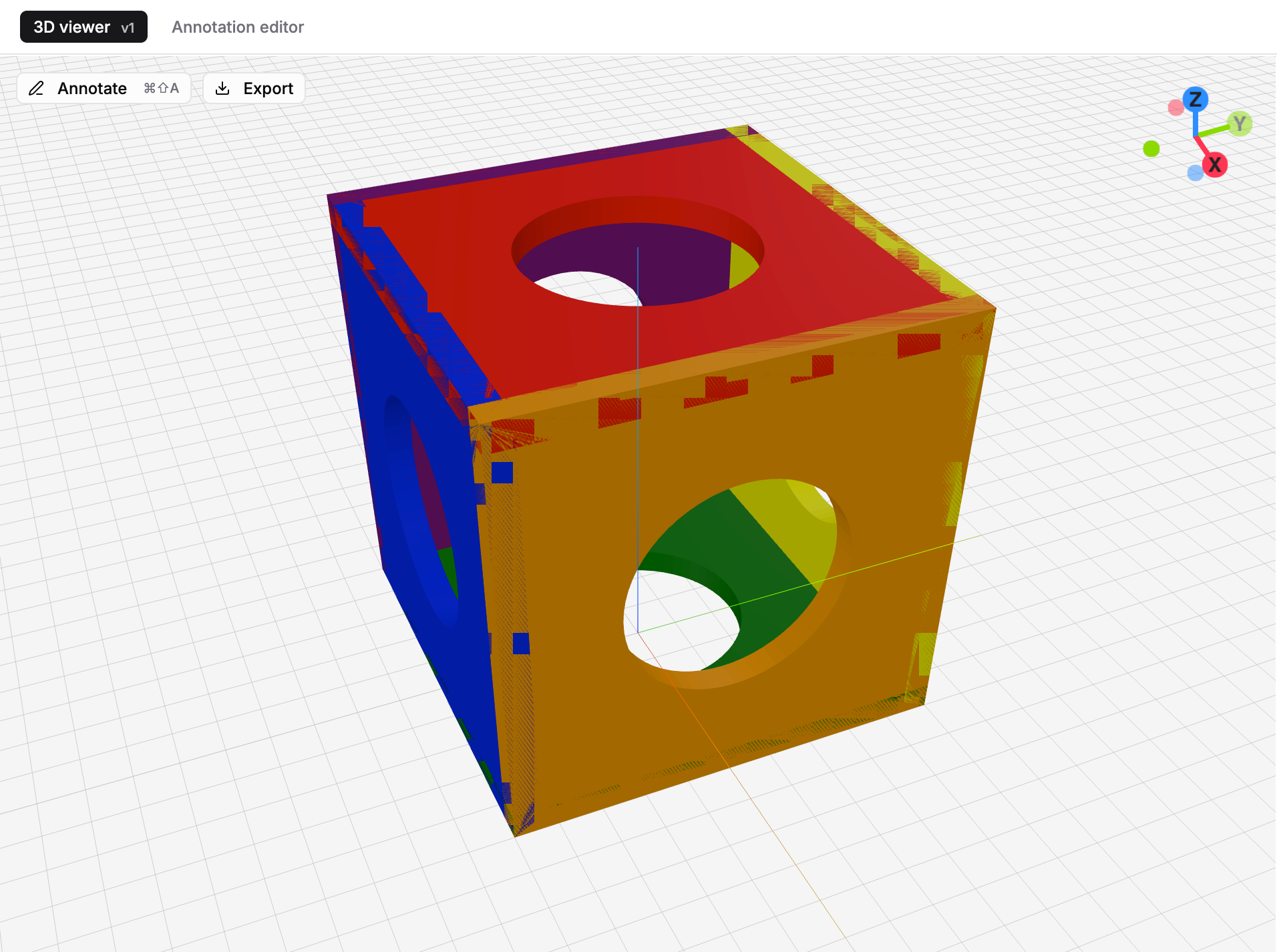
When two colored parts share a face without an epsilon gap, the preview shows z-fighting. The same geometry ambiguity that causes the visual glitch will cause slicer problems - colors in preview make this visible before you export.
The fix is to structure each colored part so it has no overlap with its neighbors. For a label on a base, that means the base has a pocket where the label sits:
base_height = 3;
label_height = 1;
epsilon = 0.05;

color("red")
  difference() {
    cylinder(h=base_height, r=20);
    translate([0, 0, base_height - label_height + epsilon])
      linear_extrude(label_height + epsilon)
        text("Hi", size=8, halign="center", valign="center");
  }

color("white")
  translate([0, 0, base_height - label_height])
    linear_extrude(label_height)
      text("Hi", size=8, halign="center", valign="center");
The white text sits in a pocket cut from the red base. The epsilon prevents exact coplanar faces at the seam, which can confuse slicers even when the volumes don’t technically overlap. Two top-level statements, two objects in the 3MF.
The AI prompt now includes rules for this: build one solid body per color, use boolean subtraction to create non-overlapping volumes, keep colored components as separate top-level children, inset shared boundaries by a small epsilon. Getting these rules right took several iterations - the first version produced geometrically correct models that still confused slicers in non-obvious ways.
What still doesn’t work
OpenSCAD’s lazy union in nightly builds has occasional bugs. Complex models with many colors sometimes export with parts in the wrong positions. Issue #6159 tracks a regression that affected multi-color 3MF export in a 2025 build. We work around known issues in the prompt by steering toward simpler geometry structures, but we can’t catch everything.
The Bambu-to-Prusa compatibility gap is also real. Bambu Studio exports 3MF files that include vendor-specific metadata. PrusaSlicer sometimes fails to parse them correctly. When we generate 3MF files we stick to the core 3MF spec to avoid this, but if you import a Bambu project file and re-export, things can break.
For the common cases - two to five colors, simple geometry, one of the major slicers - it works reliably.